How to Add Your Website and Start Earning
Complete step-by-step guide for publishers to monetize their websites by offering guest posts, backlinks, and more.
Table of Contents
1 Platform Overview & Requirements
Outreachist connects publishers (website owners) with advertisers looking for guest posts, backlinks, and content placements. As a publisher, you can monetize your website by offering various services to our network of advertisers.
Active Website
Your website must be live, regularly updated with quality content
Domain Ownership
You must own or have publishing rights to the domain
Quality Content
Original, well-written content in your website's niche
No Link Restrictions
Website must allow dofollow links to external sites
Platform Commission
Outreachist charges a 10% commission on all completed orders. You keep 90% of your earnings.
2 How to Register as a Publisher
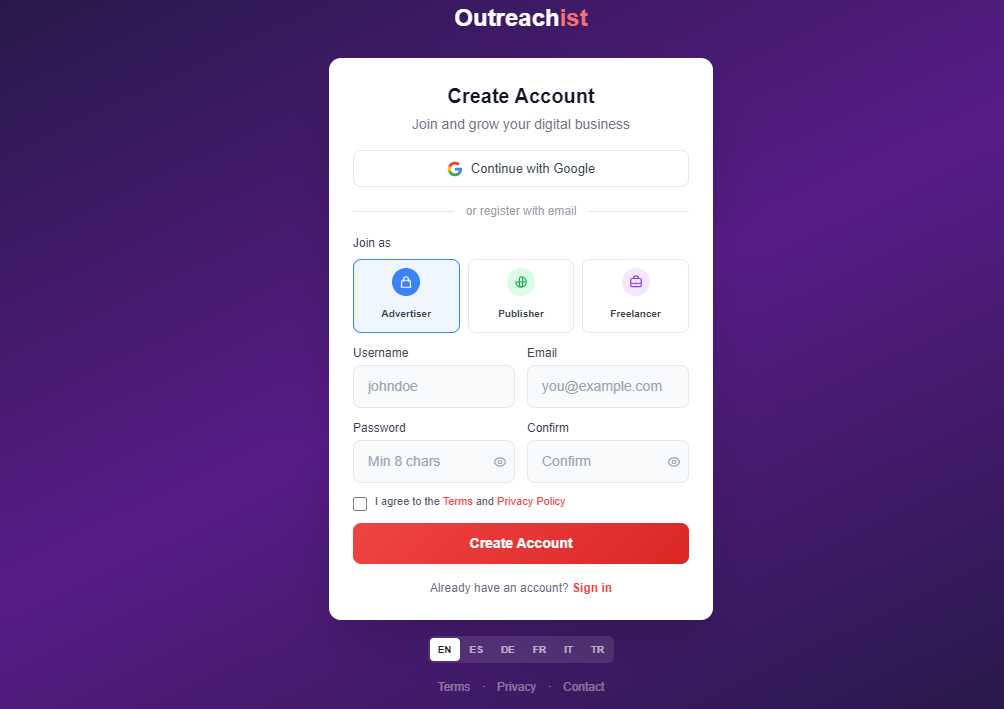
Creating a publisher account on Outreachist is free and takes less than 2 minutes.
Registration Steps:
- Go to outreachist.com/register
- Enter your name and email address
- Choose a strong password
- Select "Publisher" as your account type
- Accept our Terms of Service
- Verify your email address by clicking the link sent to your inbox
Pro Tip:
Use a professional email address. Advertisers will see this when contacting you about orders.
3 Adding Your Website
Once registered, you can add your website(s) to the platform. Each website goes through verification and approval before you can create offers.
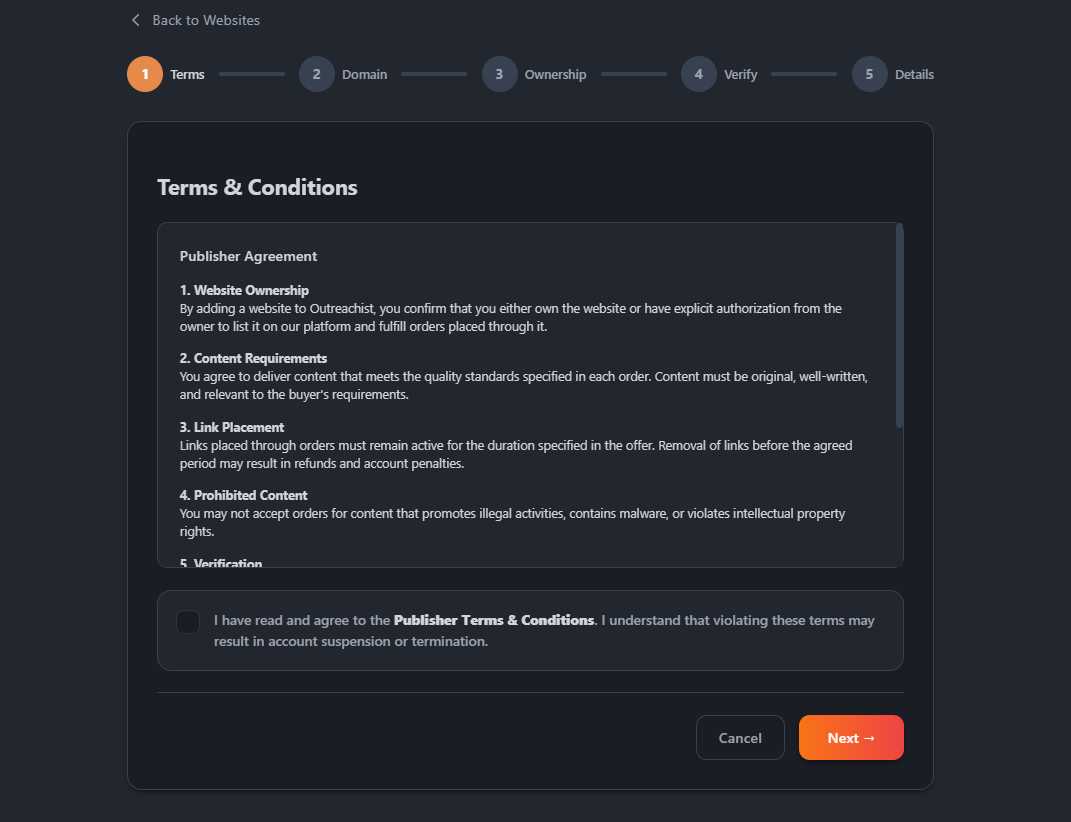
Step 1: Accept Publisher Terms
Before adding your first website, read and accept our Publisher Terms of Service, which cover:
- Proof of domain ownership or publishing rights
- Content quality and originality requirements
- Link placement and retention policies (90-day minimum)
- Payment terms and commission structure
- Dispute resolution process
Step 2: Enter Your Domain
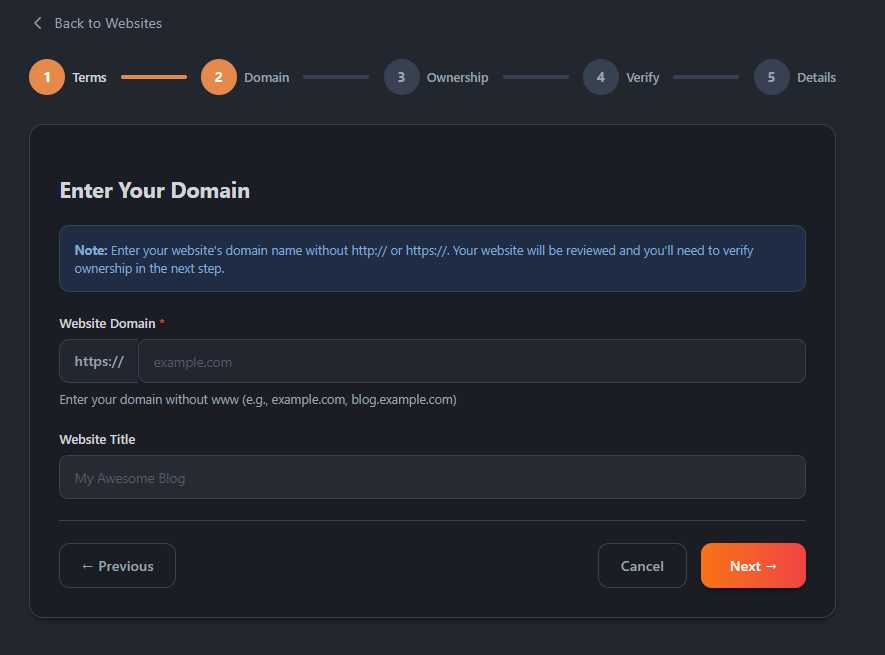
Enter only the domain name without http://, https://, or www:
Correct: example.com
Correct: blog.example.com
Wrong: https://example.com
Wrong: www.example.com/
Step 3: Select Ownership Status
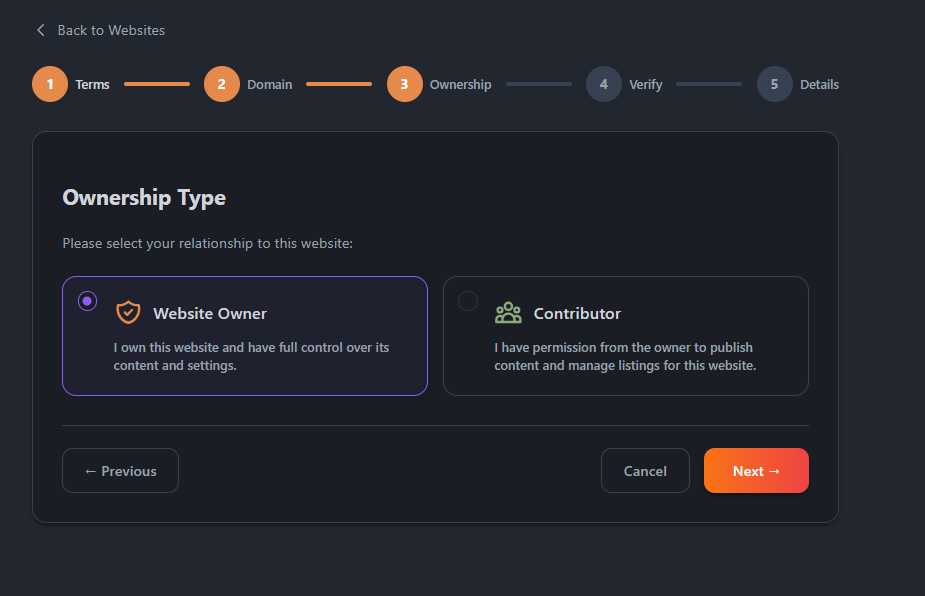
Choose your relationship with the website:
Owner
You own the domain and have full publishing rights
Contributor
You have permission to publish content but don't own the domain
Important!
If you select "Contributor", you may be asked to provide proof of publishing permission from the domain owner.
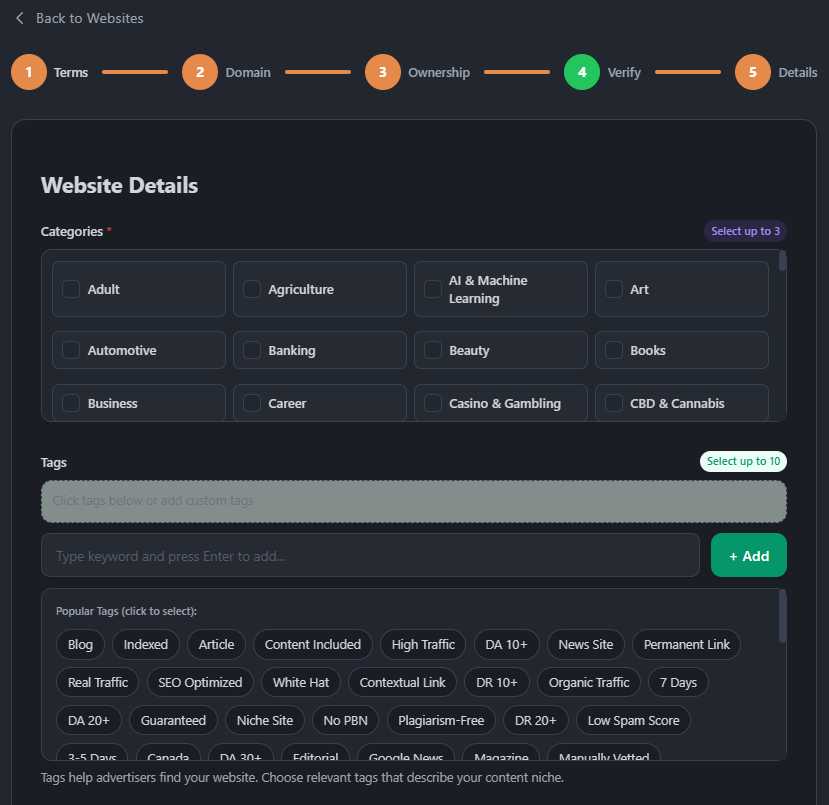
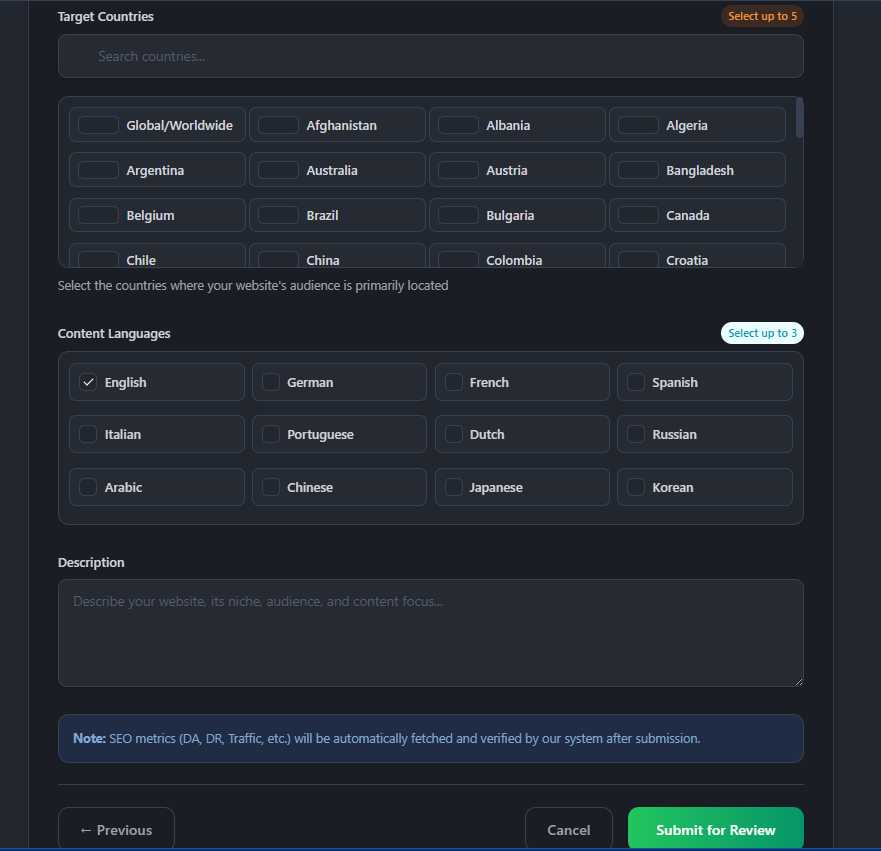
Step 4: Fill in Website Details
Provide detailed information about your website:
- Primary Category (e.g., Technology, Health, Finance)
- Tags/Keywords related to your content
- Target Countries (where your audience is located)
- Content Languages (select all languages your site supports)
- Description of your website and audience
SEO Metrics
Your SEO metrics (DA, DR, traffic) will be automatically fetched after verification. These metrics help advertisers find your website.
4 Website Verification
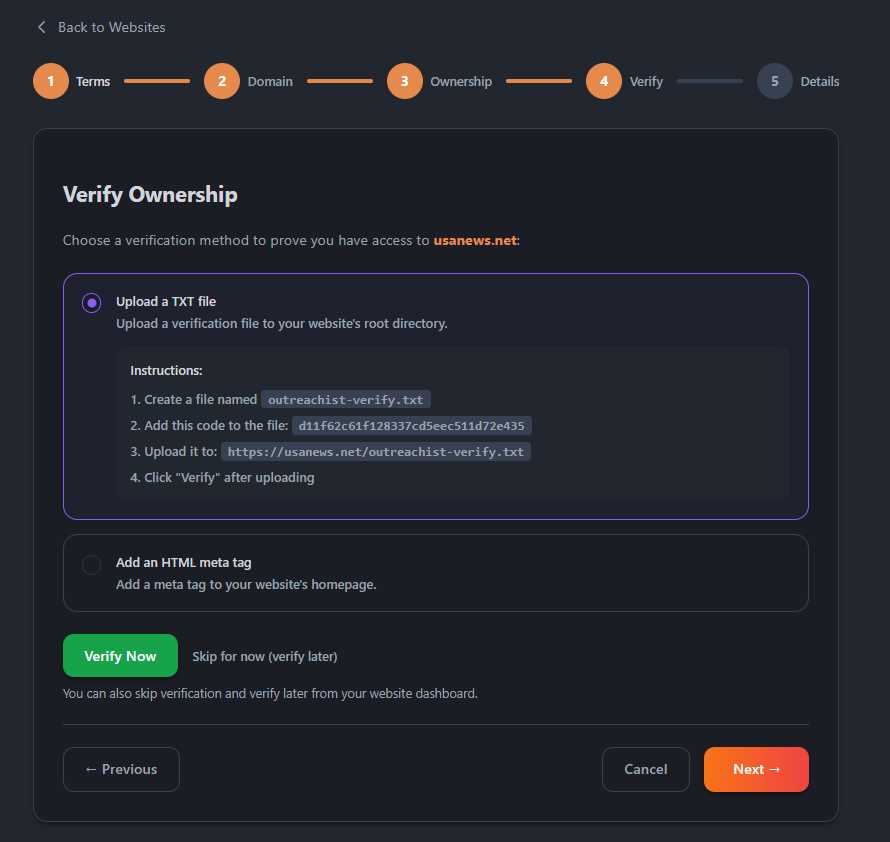
To prove you own or control the website, choose one of two verification methods:
Method 1: TXT File Upload (Recommended)
Upload a verification file to your website's root directory:
TXT File Verification Steps:
- Copy your unique verification code from the dashboard
- Create a new file named "outreachist-verify.txt"
- Paste your verification code inside the file
- Upload file to your website root (where index.html/php is located)
- Verify the file is accessible at: yoursite.com/outreachist-verify.txt
- Click "Verify Now" button in your dashboard
File location: /public_html/outreachist-verify.txt
File content: a1b2c3d4e5f6g7h8i9j0k1l2m3n4o5p6 (your unique code)
Method 2: HTML Meta Tag
Add a verification meta tag to your homepage
section:Meta Tag Verification Steps:
- Copy the meta tag code from your dashboard
- Open your homepage HTML file or template
- Paste the meta tag inside the section
- Save and upload the file to your server
- Click "Verify Now" button in your dashboard
<head>
    <meta name="outreachist-site-verification" content="a1b2c3d4e5f6g7h8i9j0">
    <!-- Other meta tags... -->
</head>
Can I Skip Verification?
Yes! You can submit for approval without verification, but approval may take longer as our team will manually verify ownership.
5 Approval Process
After adding your website, our team reviews it for quality and compliance:
What Happens During Review:
- Ownership verification (if not already verified)
- Content quality assessment
- SEO metrics collection (DA, DR, traffic)
- Spam and policy compliance check
- Final approval or rejection with feedback
Typical review time: 24-48 hours. You'll receive an email notification once reviewed.
What We Check
Active content, no spam, legitimate traffic, working HTTPS, acceptable spam score, and proper indexing status.
6 Creating Your First Offer
Once your website is approved, you can create offers for the services you want to provide.
Navigate to "My Offers"
From your publisher dashboard:
- Click "My Offers" in the sidebar
- Click "Create New Offer" button
- Select the website you want to create an offer for
- Choose the type of service you want to offer
Choose Offer Type
Select the type of service:
Guest Post
Full article with backlinks
Text Link
Link insertion in existing content
Banner Ad
Display advertising space
Press Release
News announcement publication
Fill in Offer Details
Provide complete information about your offer. Example for Guest Post:
Guest Post Offer Fields:
- Price (your asking price before commission)
- Word count (minimum article length you require)
- Number of backlinks allowed
- Link attributes (dofollow/nofollow)
- Delivery time (how long until you publish)
- Content writing included? (Yes/No)
- Requirements (topics you accept/reject, writing style)
- Sample URL (example of published content on your site)
- Description (detailed explanation of what you offer)
Content Writing Add-On
Offer content writing as an optional add-on for higher earnings. Many advertisers prefer publishers who can write content.
7 Understanding Offer Types
Guest Post
A guest post is a full article published on your website with backlinks to the advertiser's site. Typical configurations:
- 500-1000 words, 1-2 dofollow links
- Advertiser provides content OR you write it (additional fee)
- Permanent placement (minimum 90 days)
- Indexed by Google within 30 days
Text Link Insertion
Add a contextual backlink to one of your existing articles:
- Insert 1-2 anchor text links into relevant existing content
- Links must fit naturally within the context
- Permanent placement (minimum 90 days)
Banner Advertising
Display visual ads on your website:
- Specify banner size (728x90, 300x250, etc.)
- Location on page (header, sidebar, footer)
- Monthly or annual pricing
Press Release
Publish company news and announcements:
- 300-600 words, formatted as news
- Usually remains published permanently
- Great for brand awareness and SEO
8 Pricing Your Services
Setting competitive prices is key to getting orders while maximizing your earnings.
Factors That Affect Pricing:
- Domain Authority (DA) and Domain Rating (DR)
- Monthly organic traffic
- Website niche and relevance
- Link type (dofollow vs nofollow)
- Content writing included or not
- Delivery time and revision policy
General Pricing Guidelines:
| DA Range | Guest Post | Text Link | Content Writing Add-On |
|---|---|---|---|
| DA 10-20 | $25-50 | $15-30 | +$25-40 |
| DA 20-35 | $50-100 | $30-60 | +$40-60 |
| DA 35-50 | $100-200 | $60-120 | +$50-80 |
| DA 50+ | $200-500+ | $100-300+ | +$80-150+ |
Discounted First Offers
Consider pricing your first few offers competitively to build reputation and collect positive reviews.
9 Managing Orders
When an advertiser purchases your offer, you'll receive an order notification via email and in your dashboard.
Order Status Flow:
Typical Order Workflow:
- Pending - New order, payment held in escrow
- In Progress - You accepted and are working on it
- Delivered - You submitted the completed work
- Revision - Buyer requested changes
- Completed - Buyer approved, payment released
Delivering Your Order
When delivering a completed order:
- Provide the live URL where content was published
- Include any relevant details (anchor text used, link placement)
- Add a professional delivery message
- Wait for buyer approval (typically 3-7 days)
Meet Deadlines
Always deliver on time. Late deliveries hurt your reputation and can result in order cancellation.
10 Earnings & Withdrawals
You earn 90% of each order price. Platform keeps 10% commission.
When Are Earnings Released?
- Funds held in escrow until buyer approves delivery
- Auto-approved after 7 days if buyer doesn't respond
- Available for withdrawal immediately after approval
Withdrawal Methods:
- PayPal - Instant transfer (recommended)
- Bank Transfer - 3-5 business days
- Cryptocurrency - Bitcoin, USDT, Ethereum
Minimum Withdrawal
Minimum withdrawal amount is $50. There are no withdrawal fees for PayPal or crypto.
11 Tips for Success
Write Detailed Descriptions
Clear offer descriptions get more orders
Respond Quickly
Answer buyer questions within 24 hours
Quality First
Always deliver high-quality work for positive reviews
Competitive Pricing
Research similar websites to price fairly
Create Multiple Offers
Offer different services at different price points
Professional Communication
Be polite, clear, and responsive with buyers
Add Multiple Websites
If you own or manage multiple websites, add them all to maximize earning potential!
Ready to Start Earning?
Join thousands of publishers already monetizing their websites on Outreachist.